For years, investing in Zambian Treasury Bills and Government Bonds meant navigating stacks of physical paperwork, visiting bank branches in person, and waiting days just to confirm an account opening.
With the rollout of the Bank of Zambia Central Securities Depository (CSD) Investor Portal, individual retail investors can now register, submit competitive or non-competitive bids, track interest payouts, and manage their portfolio online.
If you are looking to secure high-yielding government securities but feel intimidated by the online platform, this step-by-step guide breaks down everything you need to know.
What is the BoZ CSD Portal?
The Central Securities Depository (CSD) is an electronic registry operated by the Bank of Zambia. It holds, settles, and tracks ownership of all government debt instruments—specifically:
- Treasury Bills (T-Bills): Short-term government debt issued with maturities of 91, 182, 273, or 364 days at a discount.
- GRZ Bonds: Long-term fixed-income investments issued with maturities ranging from 2 to 15 years, paying bi-annual coupon interest.
Instead of issuing physical paper certificates, the CSD logs your ownership digitally. Your CSD Account Number acts as your personal investor ID with the central bank.
Phase 1: Essential Prerequisites (What You Need Before Starting)
Before accessing the portal, assemble your documentation. Having these ready will prevent your registration from being delayed:
| Document / Requirement | Details |
| Identification | Clear PDF or image copy of your NRC (National Registration Card) for Zambian citizens, or a valid Passport for non-nationals. |
| TPIN Certificate | A valid Tax Payer Identification Number issued by the Zambia Revenue Authority (ZRA). |
| Proof of Bank Account | An official bank statement, cancelled check, or bank confirmation letter showing your full name and account details. |
| Active Email & Phone Number | Used for two-factor authentication, bid confirmations, and allotment notices. |
| Passport Photo | High-resolution digital passport-size photograph. |
Phase 2: Step-by-Step CSD Registration
1.Navigate to the Official Portal:Step 1.
Access the official Bank of Zambia CSD Portal. Ensure you are on the secure official domain (.boz.zm) to protect your personal information.
2.Create a New Account:Step 2.
Click on Register / Sign Up. Choose Individual Investor (unless registering on behalf of a registered company or institution).
3.Fill Out Personal & Banking Details:Step 3.
Provide your full legal name, NRC/Passport number, physical address, and ZRA TPIN. Next, enter your commercial bank details carefully—this is the account where your coupon payments and principal redemptions will be deposited.
4.Upload Verification Documents:Step 4.
Upload your scanned NRC/Passport, TPIN Certificate, and Bank Confirmation document in PDF or JPEG format. Ensure files are clear and under the maximum file size limit (usually under 2MB each).
5.Submit for Verification:Step 5.
Review your entries for accuracy and click Submit. Your profile enters a review queue where BoZ compliance officers verify your details against official records.
Verification Timeline: Approval usually takes between 24 to 72 business hours. Once approved, you will receive an email containing your permanent CSD Investor Account Number and temporary login credentials.
Phase 3: Bidding for Government Securities on the Portal
Once your account is active, you can participate directly in upcoming primary market auctions.
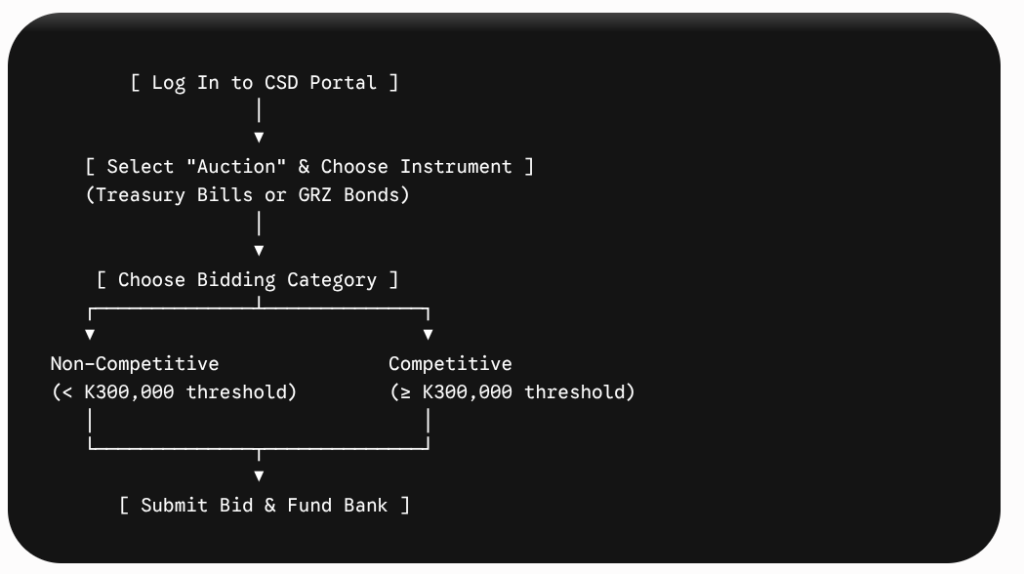
1. Non-Competitive vs. Competitive Bids
- Non-Competitive Bidding: Ideal for most retail investors bidding under K300,000. You accept the average yield determined by the market at the auction close.
- Competitive Bidding: For institutional or large retail investors placing bids K300,000 or higher. You specify the exact yield rate you are willing to accept.
2. Placing a Bid Online
- Log in to your CSD dashboard and select Auction / Open Tenders.
- Select the current tender (e.g., GRZ Bond Auction No. 03/2026 or Treasury Bill Tender No. 12/2026).
- Select your desired maturity tenure (e.g., 364-day T-Bill or 10-year Bond).
- Enter your investment amount (Face Value).
- Confirm the details and hit Submit Bid.
Phase 4: Settlement and Payment
Submitting a bid on the CSD portal does not automatically deduct money from your bank account. You must complete payment through your commercial bank upon allotment.
- Auction Results Notice: Within 24 hours of the auction closing, log in to the portal or check your email for the Allotment Advice.
- Payment Processing: If your bid is successful, the allotment advice states the exact settlement amount required.
- Electronic Funds Transfer: Provide your allotment notice to your commercial bank or process an EFT/RTGS transfer directed to the Bank of Zambia’s specified settlement account before the deadline (usually the Monday following a Friday auction).
Common Pitfalls First-Time Investors Should Avoid
- Name Mismatch: Ensure the name on your NRC matches your bank account and TPIN certificate exactly. Minor differences (like missing middle names) cause registration rejections.
- Missing Payment Deadlines: Failing to settle an allotted bid on time leads to penalty fees and temporary suspension of your CSD trading privileges.
- Ignoring Tax Implications: Remember that interest yields are subject to Withholding Tax (WHT) (currently 20% in Zambia) and a small central bank handling fee (~1%), which are automatically deducted at payout.